Best Claude Code Tools: MCP Servers Worth Installing
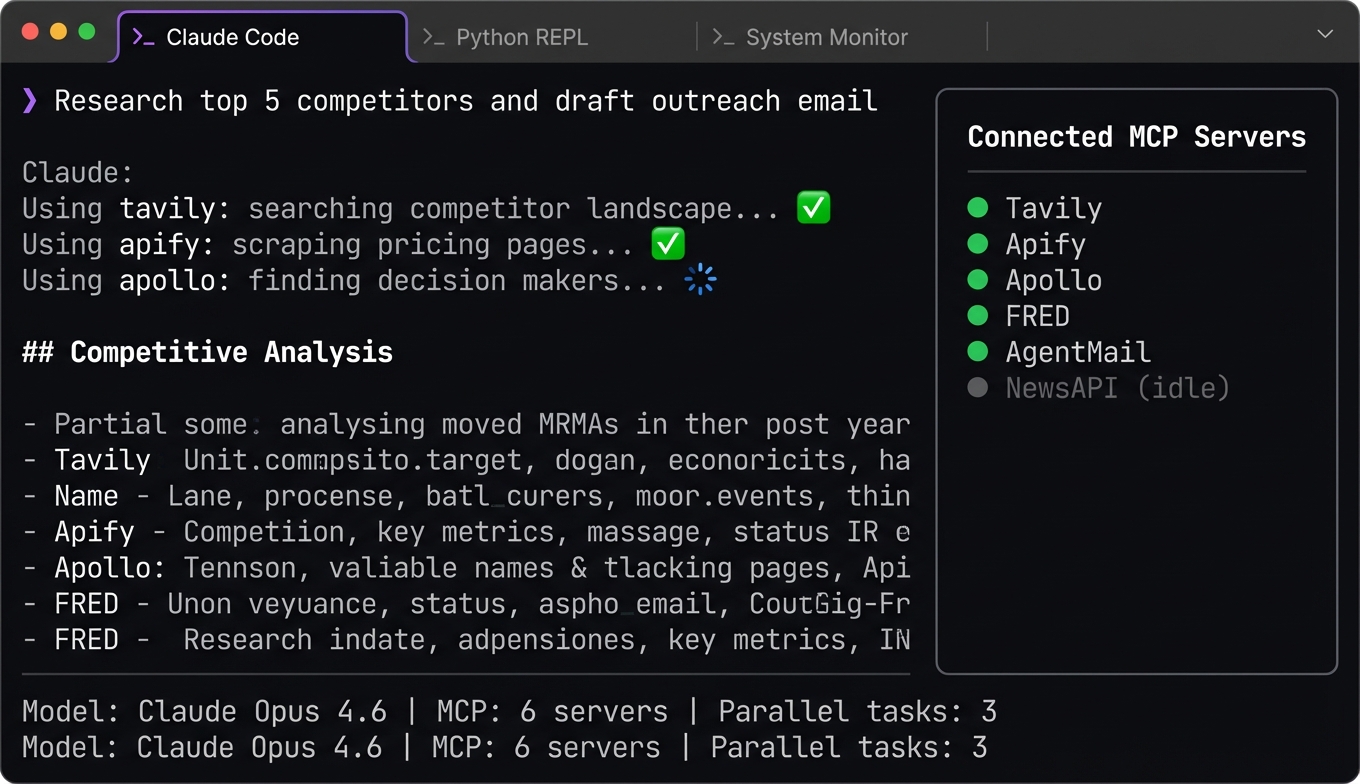
Claude Code hit $2.5 billion in ARR by February 2026. That's not just a coding tool — it's an entire category of developer workflow running through a terminal. The reason it's sticky isn't the LLM. It's the MCP integration.
Out of the box, Claude Code handles code generation and file editing. Add the right MCP servers — search, data access, email, web scraping — and it handles entire workflows.
Here are the servers actually worth adding to your config. (For a framework-agnostic view, see our best MCP tools in 2026 guide.)
How Claude Code Tools Work
Claude Code connects to external capabilities through the Model Context Protocol. Each MCP server runs as a separate process — usually a local subprocess communicating over stdio — and exposes tools that Claude Code can discover and call at runtime.
This is different from traditional IDE extensions. You're not installing a plugin that adds UI buttons. You're giving Claude Code new capabilities — the ability to search the web, query a database, send an email, or scrape a website. The LLM decides when to use each tool based on what you're asking it to do.
The practical result: you can say "research the top competitors in this space and draft an outreach email" and Claude Code will chain together search, data enrichment, and email tools without you orchestrating the steps.
Claude Code's parallel task execution makes this particularly powerful. It can spin up multiple sub-agents, each using different MCP servers simultaneously — one researching while another drafts while a third verifies data. This is multi-agent orchestration running from your terminal.
Your config lives in a JSON file, and each server gets an entry with the command to run it and any required environment variables:
{
  "mcpServers": {
    "tool-name": {
      "command": "npx",
      "args": ["-y", "@package/mcp-server"],
      "env": {
        "API_KEY": "your-key"
      }
    }
  }
}
That's it. No build steps, no dependency management, no restart required. Add the entry, and Claude Code picks up the new tools on the next session.
Best Claude Code Tools for Search and Research
Tavily
Tavily is the first MCP server most people install, and for good reason. Purpose-built for LLM consumption, it returns structured results that Claude Code can reason about immediately — no parsing step required.
The difference between Tavily and wrapping a regular search engine: results come back as clean, structured text with source attribution. No HTML, no ads, no extraction required. Claude Code can read and reason about the results immediately, which means search-then-synthesize workflows just work without a parsing step in the middle.
Free tier gives you 1,000 searches per month — more than enough for daily development use. Our Tavily MCP setup guide covers the full config, search modes, and troubleshooting.
Apify
When you need data from a website that doesn't have an API — product listings, competitor pricing, job postings, public directories — Apify fills the gap. The MCP server exposes Apify's library of 2,000+ pre-built scrapers plus the ability to run custom extraction jobs.
I use it most for competitive research workflows. "Scrape the pricing pages of these five competitors and summarize differences" is a single Claude Code interaction when Apify is connected. See our Apify MCP server tutorial for full setup and actor selection.
Browser Use
Browser Use (78,000+ GitHub stars, 89.1% on the WebVoyager benchmark) gives Claude Code the ability to navigate and interact with web pages directly. Login to a site, fill out forms, click through multi-step processes, extract data from JavaScript-heavy pages — anything that requires a real browser session.
Where Apify handles structured scraping at scale, Browser Use handles the messy interactive stuff. They complement each other well.
NewsAPI
For research workflows that need current events context, NewsAPI connects Claude Code to 150,000+ news sources with real-time coverage. Keyword search, source filtering, and date range queries make it straightforward to add "what's happening right now" awareness to any research task.
Best Claude Code Tools for Data and APIs
FRED API
The Federal Reserve's economic database — 800,000+ data series covering GDP, unemployment, inflation, interest rates, housing, and more. As a Claude Code tool, FRED turns "what's the current inflation trend" from an LLM guess into a data-backed answer.
Particularly valuable for developers building financial tools, market analysis features, or anything that needs to reference real economic data. The free tier is generous: 120 requests per minute with no monthly cap.
Census Bureau API
Demographic data at every geographic level — national to ZIP code. Population, income, education, housing, business statistics. The Census MCP server makes the Bureau's famously complex API accessible through natural language queries.
If you're building anything that involves market sizing, user demographics, or geographic analysis, this is one of the most valuable free data sources you can connect.
Google Trends
Search interest data over time. Is a topic gaining or losing attention? How does interest vary by region? Which of two competing terms gets more search volume? Google Trends gives Claude Code quantitative trend data that's more current than any training dataset.
Best used alongside absolute data sources like FRED — Trends tells you direction and relative magnitude, not absolute numbers.
OpenRouter
If you're using Claude Code but occasionally need a different model for specific tasks — a cheaper model for simple operations, or a specialized model for a particular domain — OpenRouter gives you access to dozens of providers through a single MCP interface. Practical for cost optimization and model failover.
Best Claude Code Tools for Email and Outreach
Apollo.io
Apollo.io provides B2B contact and company data — the prospecting layer for any outreach workflow. Search for decision-makers by role, company size, industry, and location. Enrich existing contacts with verified email addresses and phone numbers.
As a Claude Code integration, it lets you go from "find the engineering leads at Series B fintech companies" to a structured prospect list in a single interaction.
Instantly.ai
Once you have contacts, Instantly handles the sending. Email campaign creation, automated warm-up, sender rotation, and deliverability management — all accessible through MCP. Your agent can build and launch an outreach campaign end-to-end.
The Apollo → Reoon (verification) → Instantly pipeline is one of the most common integrations for sales teams. Our sales prospecting pipeline guide walks through the complete workflow with config examples.
Reoon
Email verification. It sounds like a minor utility until you send 500 emails and 80 bounce because the addresses were stale. Reoon validates addresses before they hit a campaign, protecting your sender reputation. As a pipeline step between prospecting and outreach, it's cheap insurance.
AgentMail
Where Instantly handles campaign-style outreach (one-to-many), AgentMail handles conversational email (one-to-one). Built specifically for AI agents that need to send, receive, and manage email threads as part of a workflow. Customer support, follow-up sequences, scheduling — anything where the agent participates in an ongoing email conversation.
How to Add MCP Servers to Claude Code
Adding MCP servers is a config file edit. Your settings file (typically ~/.claude/settings.json or project-level .claude/settings.json) holds the MCP server definitions:
{
  "mcpServers": {
    "tavily": {
      "command": "npx",
      "args": ["-y", "@tavily/mcp-server"],
      "env": {
        "TAVILY_API_KEY": "tvly-your-key"
      }
    },
    "apollo": {
      "command": "npx",
      "args": ["-y", "@apollo/mcp-server"],
      "env": {
        "APOLLO_API_KEY": "your-key"
      }
    },
    "fred": {
      "command": "npx",
      "args": ["-y", "@fred/mcp-server"],
      "env": {
        "FRED_API_KEY": "your-key"
      }
    }
  }
}
A few practical tips:
Start with two or three servers. Every connected MCP server adds tool descriptions to Claude Code's context. Too many tools and the model spends tokens evaluating irrelevant options or picks a similar-but-wrong tool. Add servers as your workflows need them, not preemptively.
Use project-level configs for project-specific tools. Your research workflow might need different servers than your coding workflow. Project-level settings override user-level ones, keeping each workspace clean.
Check API key requirements upfront. Most tools here have free tiers: Tavily (1,000 searches/month), FRED (free, unlimited), Census Bureau (free), Google Trends (free). Outreach tools like Apollo and Instantly have free tiers with limits. Know what you're signing up for before you're mid-workflow.
Test with a simple query first. After adding a server, ask Claude Code a question that should trigger that tool. Verify it connects, returns structured data, and handles errors gracefully before building complex workflows around it.
Frequently Asked Questions
What are Claude Code tools?
Claude Code tools are MCP (Model Context Protocol) servers that extend Claude Code's capabilities beyond code generation. Each MCP server gives Claude Code access to an external service — web search, databases, email, web scraping, data APIs — through a standardized protocol. The tools are discovered at runtime, so Claude Code automatically knows what's available and can decide when to use each tool based on your request. With 10,000+ MCP servers published as of early 2026, Claude Code can be extended for almost any workflow.
How do I add MCP servers to Claude Code?
Add a JSON entry to your Claude Code settings file (user-level at ~/.claude/settings.json or project-level at .claude/settings.json). Each entry specifies the server command, arguments, and environment variables like API keys. Most servers install via npx with no manual dependency management. Claude Code discovers the new tools automatically on the next session — no restart or build step required.
How many MCP servers should I use with Claude Code?
Start with two or three that directly support your primary workflow. Each MCP server adds tool descriptions to Claude Code's context window, and too many tools can cause selection confusion or waste tokens. Most productive setups use five to eight servers across search, data, and action categories. Add servers incrementally as your workflows demand new capabilities rather than installing everything upfront.
Are Claude Code MCP servers free?
Many of the best MCP servers have free tiers. Tavily offers 1,000 free searches per month. FRED API and Census Bureau API are free government services. Google Trends is free. Apify includes $5/month in credits. Outreach tools (Apollo, Instantly) have free tiers with usage limits and paid plans for volume. The MCP server packages themselves are almost always open-source — you pay for the underlying API service, not the protocol connector.
What's the difference between Claude Code tools and Cursor extensions?
Claude Code tools are MCP servers that run as external processes and communicate via the Model Context Protocol. They're not IDE extensions — they're capabilities the LLM can call, like searching the web or querying a database. Cursor also supports MCP servers, so many of the same tools work in both environments. The difference is in the interface: Claude Code is terminal-native with parallel multi-agent execution, while Cursor provides an IDE experience. The underlying MCP tools are portable between them.