Best AI Agent Tools for Developers in 2026
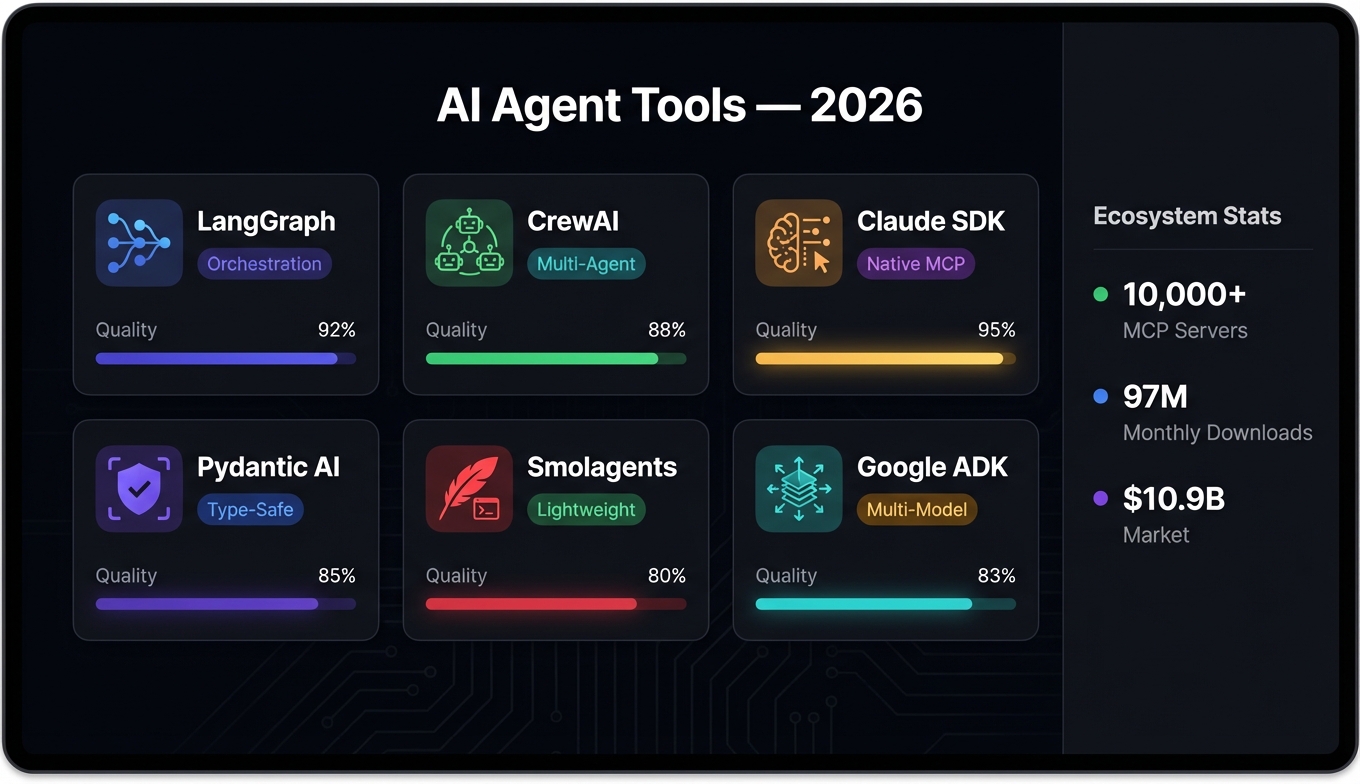
The AI agent tools landscape in 2026 is unrecognizable from a year ago. The market hit $10.9 billion, Gartner says 40% of enterprise apps now embed task-specific agents (up from under 5% in 2025), and the Model Context Protocol has over 10,000 servers after being donated to the Linux Foundation last December.
More tools doesn't mean more clarity. The explosion of frameworks, SDKs, and MCP servers has made it harder to figure out what's actually worth using versus what's well-marketed.
This guide covers what's good, what's overhyped, and how to assemble a stack that won't fall apart when you need it to do real work.
What Makes a Great AI Agent Tool in 2026
Before diving into specific tools, it's worth establishing what separates the useful from the flashy. The bar has shifted significantly.
MCP compatibility is table stakes
The Model Context Protocol has become the USB-C of AI tooling. With 10,000+ servers and adoption by every major platform, any tool that doesn't speak MCP is asking you to write custom integration code that someone else has already standardized. That's plumbing you shouldn't have to maintain. (See our MCP vs function calling comparison for when each approach makes sense.)
Composability over features
The best tools aren't monoliths — they're pieces that snap together. A framework that does everything but plays nicely with nothing is worse than a focused tool that plugs into your existing workflow. The MCP + A2A (agent-to-agent) protocol stack lets you compose tools from different vendors without writing glue code.
Developer experience still matters
79% of organizations report adopting AI agents, but adoption doesn't mean satisfaction. The tools that win are the ones where you spend time on the actual problem, not on configuration or debugging the framework itself. Type safety, good error messages, sensible defaults — the boring stuff is what makes a tool usable past the demo stage.
Observability and control
When 88% of senior executives are increasing AI budgets, they want to know what the agents are doing. Tools that give you visibility into agent reasoning, tool calls, and decision paths aren't nice-to-have — they're what gets your project past the security review.
Top AI Agent Frameworks and SDKs
These are the frameworks you'd actually use to build agents, ranked by how much real production work I've seen them power.
LangGraph
LangGraph has earned its 14,000+ GitHub stars and 4.2 million monthly downloads. The graph-based approach to defining agent workflows clicked for the industry in a way that pure chain-of-thought frameworks didn't. You define nodes (LLM calls, tool invocations, human checkpoints) and edges (conditional routing), and you get a stateful agent that's actually debuggable.
Where it shines: complex multi-step workflows where you need branching logic, retry handling, and human-in-the-loop checkpoints. If your agent needs to decide between three different paths based on intermediate results, LangGraph makes that explicit rather than emergent.
Where it's overkill: simple single-turn tool use. If you just need an LLM to call a search API and summarize results, LangGraph's graph abstraction adds ceremony you don't need.
CrewAI
CrewAI took the multi-agent pattern and made it accessible. The role-based approach — define agents with specific expertise, give them tools, let them collaborate — maps naturally to how teams actually work. The numbers back this up: 450 million monthly workflows and adoption across 60% of the Fortune 500.
The sweet spot is orchestration-heavy tasks. Sales research pipelines, content workflows, data analysis with multiple validation steps. You define a "crew" of specialized agents, assign them roles and goals, and CrewAI handles the coordination.
Fair warning: multi-agent systems are inherently harder to debug than single-agent ones. When something goes wrong in a crew of five agents, figuring out which agent made the bad decision and why takes patience.
Claude Agent SDK
Anthropic released the Claude Agent SDK in September 2025, and it's become the most natural way to build agents that lean heavily on MCP tool servers. The SDK handles the agent loop (think → tool call → observe → think) with first-class support for MCP connections, which means you can point your agent at any MCP server and it just works.
If you're already building on Claude — and especially if you're using Claude Code as your development environment — the Agent SDK fits like a glove. The parallel task execution support is genuinely useful for workflows where you need to gather information from multiple sources simultaneously.
Pydantic AI
This one's a sleeper. Pydantic AI brings the FastAPI philosophy to agent development: type-safe, minimal boilerplate, excellent developer ergonomics. Built-in MCP and A2A support means it plays well with the broader ecosystem from day one.
If you're a Python developer who values type safety and clean architecture, Pydantic AI feels like coming home. The structured output validation alone saves hours of defensive coding.
Smolagents
Hugging Face's Smolagents takes the opposite approach from the heavy frameworks: minimalist, code-first, and opinionated about simplicity. Agents write and execute Python directly rather than routing through complex abstractions. For prototyping and research use cases, there's nothing faster.
Google ADK and OpenAI Agents SDK
Both deserve mention. Google's Agent Development Kit supports multi-model deployments (Gemini + Claude via Vertex AI) and the A2A protocol, making it strong for enterprise multi-vendor setups. The OpenAI Agents SDK focuses on managed infrastructure and hosted deployment, which appeals to teams that don't want to run their own compute.
Best MCP Servers for Developer Workflows
MCP servers are where your agents get their capabilities. Think of the framework as the brain and MCP servers as the hands. Here are the ones that actually earn their keep.
Search and Research
Tavily has become the default search MCP server for a reason. It's purpose-built for AI agents — the results come back structured and ready for LLM consumption rather than as raw HTML you have to parse. For any workflow that starts with "find information about X," Tavily is what you reach for. (Need the exact config? Our Tavily MCP setup guide covers it step by step.)
For news-specific use cases, NewsAPI gives you real-time access to 150,000+ sources. Pair it with Tavily for a research pipeline that handles both general search and current events. For a full ranked list of MCP servers, see our best MCP tools guide.
Web Interaction
Apify handles web scraping and browser automation via MCP. When your agent needs to extract structured data from websites, fill out forms, or interact with pages that don't have APIs, Apify is the bridge. The actor model means you can find pre-built scrapers for most common sites and customize them as needed. Our Apify MCP tutorial walks through setup and building search-to-scrape pipelines.
Data and Analytics
This is where specialized MCP servers really shine. The FRED API gives agents access to Federal Reserve economic data — invaluable for financial analysis workflows. The Census Bureau API opens up demographic and economic data for research agents. Google Trends lets agents track search interest patterns over time.
These aren't glamorous, but they're the kind of tools that turn a chatbot into something that can actually do analysis.
LLM Routing
OpenRouter deserves special mention. Rather than hard-coding a single LLM provider, OpenRouter gives your agents access to dozens of models through a single MCP interface. This matters for cost optimization (route simple tasks to cheaper models) and for resilience (failover to a different provider if one goes down).
Email and Outreach
AgentMail is purpose-built for agent-driven email — not an email API retrofitted with an MCP wrapper, but something designed from the ground up for agents that need to send, receive, and manage email threads. Instantly.ai handles outreach-specific workflows with built-in warm-up and deliverability management. See our AI sales prospecting pipeline guide for how these tools chain together into a complete outreach workflow.
You can browse all available AI agent tools on ClawsMarket to find MCP servers for your specific use case.
AI Agent Tools for Data and Research
Research-heavy workflows are where AI agents deliver the most obvious ROI. Here's a practical stack for building a research agent.
The basic research pipeline
A solid research agent in 2026 typically chains three stages:
- Discovery — Use Tavily or a custom search MCP server to find relevant sources
- Extraction — Use Apify or a browser automation tool to pull structured data from those sources
- Analysis — Feed the extracted data through an LLM with access to reference data (FRED, Census, etc.)
# Example: Research agent with CrewAI + MCP tools
from crewai import Agent, Task, Crew

researcher = Agent(
    role="Market Researcher",
    goal="Find and analyze market data",
    tools=[tavily_search, fred_api, google_trends],
    llm="claude-sonnet-4"
)

analyst = Agent(
    role="Data Analyst",
    goal="Synthesize findings into actionable insights",
    tools=[census_api, spreadsheet_tool],
    llm="claude-sonnet-4"
)

research_task = Task(
    description="Research current trends in {topic}",
    agent=researcher,
    expected_output="Structured research brief with sources"
)

analysis_task = Task(
    description="Analyze research and produce report",
    agent=analyst,
    expected_output="Executive summary with data visualizations"
)

crew = Crew(agents=[researcher, analyst], tasks=[research_task, analysis_task])
result = crew.kickoff(inputs={"topic": "AI agent adoption in fintech"})
Claude Code as a research environment
Claude Code deserves a callout here because it's become more than a coding tool. With deep MCP integration and parallel task execution, it functions as a research environment where you can point it at multiple data sources, ask a complex question, and get back synthesized analysis. The terminal-based workflow means everything is scriptable and reproducible.
For developers already using Claude Code as their primary coding tool, adding research MCP servers to the configuration turns it into a surprisingly capable analysis platform without switching contexts.
Verification matters
One pattern I've seen work well: build verification into your pipeline, not as an afterthought. Use Reoon to validate email addresses before outreach. Cross-reference claims against multiple data sources. Have a second agent review the first agent's work. The 66% of adopters reporting increased productivity aren't the ones shipping hallucinated data to their stakeholders.
How to Choose the Right Tool Stack
With this many options, the decision paralysis is real. Here's how I'd think about it.
Start with your deployment model
- Building a product with embedded agents? → Claude Agent SDK or OpenAI Agents SDK. You want managed infrastructure and clean APIs.
- Orchestrating complex internal workflows? → LangGraph or CrewAI. You need state management and observability.
- Prototyping or researching? → Smolagents or Pydantic AI. You need speed and flexibility.
- Need multi-vendor LLM support? → Google ADK with OpenRouter as your model gateway.
Then pick your MCP servers
Don't install everything. Start with the two or three MCP servers your workflow actually needs. Tavily for search is almost always one of them. After that, pick based on your domain — financial data tools for fintech, outreach tools for sales, scraping tools for competitive intelligence.
The composability test
Before committing to any framework, ask: can I swap out any single component without rewriting everything else? If the answer is no, you're building on a monolith dressed up as a platform. The MCP ecosystem's whole point is that tools are interchangeable. Your framework should respect that.
What about cost?
The 57% of organizations reporting cost savings from AI agents aren't spending recklessly. They're routing simple tasks to fast, cheap models and reserving expensive models for complex reasoning. OpenRouter makes this practical at the tool level. At the framework level, LangGraph and CrewAI both support model routing per node or per agent.
A reasonable starting budget for a production agent workflow: $50–200/month for LLM costs, plus whatever your MCP server subscriptions run. Most of the tools on ClawsMarket have free tiers generous enough to prototype on.
Frequently Asked Questions
What are the best AI agent tools for beginners in 2026?
Start with Claude Code for an immediate agentic coding experience with no setup required, then explore Pydantic AI or Smolagents for building your own agents. Both have minimal boilerplate and good documentation. For MCP tools, Tavily for search and OpenRouter for model access give you a functional agent with just two integrations. Avoid the heavy orchestration frameworks (LangGraph, CrewAI) until you have a use case that genuinely requires multi-step or multi-agent workflows.
What are the best MCP servers available right now?
The MCP ecosystem has over 1,200 servers, but the most battle-tested ones for developer workflows include Tavily (search), Apify (web scraping), and the various data API servers like FRED and Census Bureau. For a curated directory, browse the ClawsMarket tools catalog — everything listed there has been tested for MCP compatibility and reliability. The best MCP tools are the ones that solve a specific problem well rather than trying to do everything.
How do AI agent frameworks compare to each other in 2026?
The key distinction is between orchestration frameworks (LangGraph, CrewAI) that manage complex multi-step workflows, vendor SDKs (Claude Agent SDK, OpenAI Agents SDK) that are optimized for a specific provider's models, and lightweight libraries (Pydantic AI, Smolagents) that prioritize developer speed. There's no single "best" — LangGraph's 4.2 million monthly downloads reflect its strength in production workflows, while CrewAI's Fortune 500 adoption shows its enterprise appeal. Pick based on your deployment model, not hype.
Is MCP really the standard for AI agent tools?
Yes, and the trend is accelerating. With 1,200+ servers, donation to the Linux Foundation, and native support in Claude, the Claude Agent SDK, Google ADK, and Pydantic AI, MCP has achieved the network effects that make a protocol sticky. The companion A2A protocol (agent-to-agent) extends this to inter-agent communication. If you're building agent tools today and not supporting MCP, you're creating integration debt you'll pay later.
How much do AI agent tools cost to run in production?
It depends heavily on your volume and model choices, but a typical production agent workflow runs $50–200/month in LLM costs. MCP server costs vary — many have free tiers, and data APIs like FRED and Census Bureau are free. The real cost optimization lever is model routing: use fast, inexpensive models for simple tasks and reserve powerful models for complex reasoning. Tools like OpenRouter make this routing practical without code changes.