OpenClaw Skills: What They Are and How to Use Them
Most developers discover OpenClaw through its core agent loop — give an LLM a goal and let it reason through the steps. That's useful, but limited. An agent without tools is just a chatbot with ambition.
Skills are how you close that gap. They turn a capable reasoner into an agent that can do things — search the web, send emails, query databases, scrape websites, verify data. Unlike one-size-fits-all plugin systems, OpenClaw's skill architecture was designed for composability from the start.
This guide covers what skills are, which ones are worth installing, and how to build your own.
What Are OpenClaw Skills and How They Work
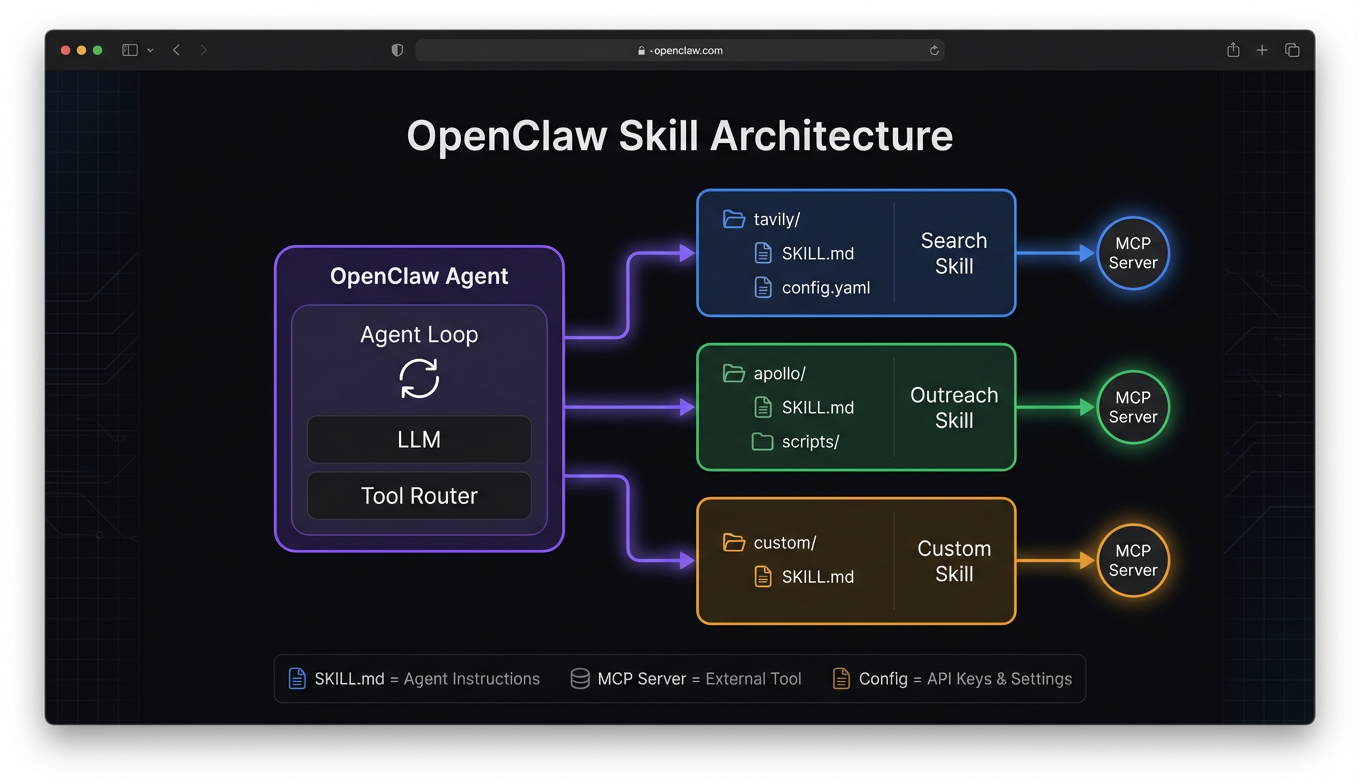
An OpenClaw skill is a packaged bundle of capabilities that extends what your agent can do. Each skill typically includes a SKILL.md file (instructions the agent reads to understand how to use the skill), optional scripts, configuration templates, and sometimes MCP server definitions.
The distinction from raw MCP servers matters. An MCP server gives your agent tools — callable functions with schemas. A skill gives your agent tools plus context — how to use them, when to use them, what workflows they fit into, and what pitfalls to avoid. Think of it as the difference between handing someone a wrench and handing them a wrench with a repair manual.
When your agent encounters a task that matches a skill's description, it reads the skill file, follows the instructions, and uses the associated tools. This happens automatically — you don't need to tell the agent which skill to use for each task.
Skill architecture
Skills live in your OpenClaw workspace under a skills/ directory. Each skill is a folder:
skills/
  weather/
    SKILL.md
    config.yaml
  github/
    SKILL.md
    scripts/
      pr-review.sh
The SKILL.md is the core — it's what the agent reads to understand the skill. Everything else supports it: config files for API keys, scripts for complex operations, reference docs for edge cases.
This file-first approach means skills are inspectable, editable, and version-controllable. No opaque plugin binaries. You can read exactly what a skill tells your agent to do, modify the instructions if they don't fit your workflow, and track changes in git.
Skills vs MCP servers
You'll hear both terms used in the OpenClaw ecosystem, and they overlap but aren't synonymous. MCP servers are the underlying protocol layer — they expose tools via the Model Context Protocol. Skills are a higher-level abstraction that may include MCP servers but also include instructions, workflow patterns, and configuration.
Some skills are wrappers around a single MCP server with added context. Others orchestrate multiple MCP servers into a cohesive workflow. And some don't use MCP at all — they're pure instruction sets that teach the agent how to use shell commands, local files, or existing system capabilities more effectively.
Best OpenClaw Skills for Research and Data
Web search with Tavily
Tavily is the most commonly installed research skill, and for good reason. The skill doesn't just connect the Tavily MCP server — it teaches the agent how to search effectively. When to use deep search versus quick search, how to cross-reference multiple queries, how to extract and cite sources properly.
The skill includes configuration for search depth, result count, and domain filtering. In practice, agents with the Tavily skill produce noticeably better research output than agents with just the raw MCP server, because the skill instructions encode search strategies that the agent wouldn't discover on its own.
Real-time news with NewsAPI
NewsAPI connects your agent to 150,000+ news sources for current events monitoring. The skill shines in workflows where timeliness matters — competitive intelligence, market monitoring, PR tracking. The skill instructions guide the agent on source reliability, date filtering, and how to distinguish breaking news from evergreen content.
Pairs naturally with Tavily: use Tavily for broad research and background context, NewsAPI for what happened in the last 24 hours.
Government data skills
The FRED API and Census Bureau API skills deserve special mention for anyone building analysis workflows. FRED opens up 800,000+ economic data series — GDP, employment, inflation, interest rates. Census provides demographic data down to ZIP code granularity.
These aren't glamorous, but they're what separate agents that make claims from agents that back claims with data. The skill instructions teach the agent which series codes to use for common queries, how to handle seasonal adjustments, and how to interpret the data structures these APIs return.
Web scraping with Apify
When you need data from websites that don't have APIs — competitor pricing, product catalogs, job listings — the Apify skill handles structured extraction. The skill includes guidance on selecting the right pre-built actors for common sites and configuring custom scraping runs for everything else.
Best OpenClaw Skills for Outreach and Communication
Email verification with Reoon
Reoon validates email addresses before they hit an outreach campaign. The skill sits between your prospecting and sending tools, catching invalid addresses that would otherwise damage sender reputation. Not exciting, but any team running email outreach at scale considers it essential.
The skill instructions handle batch verification workflows — feed in a list, get back validated results with risk scores, automatically filter out high-risk addresses before they reach your sending tool.
Sales outreach with Instantly
The Instantly.ai skill turns your agent into an outreach operator. Campaign creation, warm-up management, sending schedules, and performance monitoring — all accessible through natural language instructions to your agent.
Where it gets interesting is chaining: Apollo for prospecting → Reoon for verification → Instantly for sending. The skill instructions for each tool include guidance on how to hand off data to the next stage, so the agent can run the full pipeline without manual intervention.
Agent-native email with AgentMail
AgentMail handles the other side of email — not campaigns, but conversations. When your agent needs to receive emails, parse them, reply contextually, and manage threads over time, AgentMail provides the skill layer for genuine back-and-forth email interaction. Customer support, scheduling, and follow-up workflows all benefit from this pattern.
How to Install and Manage OpenClaw Skills
Installing skills from a marketplace like ClawsMarket is straightforward. Most skills install with a single command or a config entry:
# Install from ClawsMarket
openclaw skill install tavily

# Or add manually to your config
# openclaw.yaml
skills:
  - name: tavily
    config:
      api_key: "${TAVILY_API_KEY}"
  - name: reoon
    config:
      api_key: "${REOON_API_KEY}"
Managing your skill set
A few practical guidelines from running OpenClaw skills in production:
Keep it lean. Every skill adds context that the agent processes. Five to eight well-chosen skills outperform twenty loosely relevant ones. If a skill doesn't serve your active workflows, disable it.
Pin versions. Skills evolve, and an update can change behavior. Pin to specific versions in production and test updates before rolling them out.
Review SKILL.md before installing. Since skills contain instructions your agent follows, you should know what those instructions say. A skill that tells your agent to "always prefer detailed responses" might conflict with your preference for brevity. The file-first architecture makes this review trivial — just read the markdown.
Set up API keys before enabling. Most skills that connect to external services need API keys configured as environment variables. Check the skill's requirements and set them up before expecting the skill to work. Free tiers exist for most tools — Tavily, FRED, Census, and NewsAPI all offer free access sufficient for development.
For a deeper dive on safe evaluation practices, see our guide on OpenClaw skill safety.
Building Custom OpenClaw Skills
If you can't find a skill for your use case, building one is more accessible than you'd expect. At minimum, you need a SKILL.md file.
Basic skill structure
# My Custom Skill

## When to Use
Use this skill when the user asks about [specific domain].

## Tools Available
- `my_tool`: Does X with parameters Y and Z

## Workflow
1. First, gather context by...
2. Then, process using...
3. Finally, format the output as...

## Common Pitfalls
- Don't call the API more than 10 times per query
- Always validate input before passing to the tool
That's a working skill. The agent reads it, understands when to apply it, and follows the workflow. No SDK, no compilation, no deployment pipeline.
Adding MCP servers
If your skill needs external tool access, include an MCP server definition:
# skill-config.yaml
mcp_servers:
  my_service:
    command: npx
    args: ["-y", "@myorg/mcp-server"]
    env:
      API_KEY: "${MY_SERVICE_KEY}"
Publishing to ClawsMarket
Once your skill works locally, you can share it through the tool marketplace. Package the skill folder, add metadata (description, category, compatibility), and submit for review. Published skills get compatibility testing across framework versions and a quality score that helps other developers evaluate them.
For more on how tools and workflows compose in practice, see our guide on building agent workflows.
Frequently Asked Questions
What are OpenClaw skills?
OpenClaw skills are packaged bundles of capabilities that extend what your AI agent can do. Each skill includes a SKILL.md instruction file that teaches the agent how and when to use the associated tools, plus optional configuration, scripts, and MCP server definitions. Unlike raw MCP servers which just expose callable functions, skills add workflow context, best practices, and usage guidance that improve how the agent applies the tools. Skills live in your workspace as readable, editable files.
How do I install OpenClaw skills?
Install skills via the CLI (openclaw skill install <name>) or by adding entries to your openclaw.yaml config file with the skill name and any required configuration like API keys. Skills from ClawsMarket are tested for compatibility before listing. After installation, set up any required environment variables for API keys — most skills document their requirements clearly. The agent discovers installed skills automatically on the next session.
What's the difference between OpenClaw skills and MCP servers?
MCP servers expose tools via the Model Context Protocol — they give your agent callable functions with schemas. OpenClaw skills are a higher-level abstraction that may include MCP servers but also include agent instructions, workflow patterns, and configuration guidance. A skill teaches the agent not just what it can do, but how and when to do it. Some skills wrap a single MCP server with added context; others orchestrate multiple servers into cohesive workflows; some use no MCP servers at all.
How many OpenClaw skills should I install?
Five to eight skills is the practical sweet spot for most agents. Each skill adds instructions and tool descriptions to the agent's context, and too many skills cause selection confusion or waste tokens evaluating irrelevant options. Start with two or three that directly support your primary workflow — typically a search skill and one or two domain-specific skills — then add more as your needs grow. Disable skills you're not actively using to keep context lean.
Can I build my own OpenClaw skills?
Yes, and it's simpler than most plugin systems. At minimum, create a folder with a SKILL.md file containing instructions for when and how to use the skill. Add MCP server definitions if the skill needs external API access, and include configuration templates for API keys. No SDK or compilation required — skills are markdown files the agent reads directly. Once tested locally, you can publish skills to ClawsMarket for other developers to use.