10 Best OpenClaw Tools to Supercharge Your AI Agent
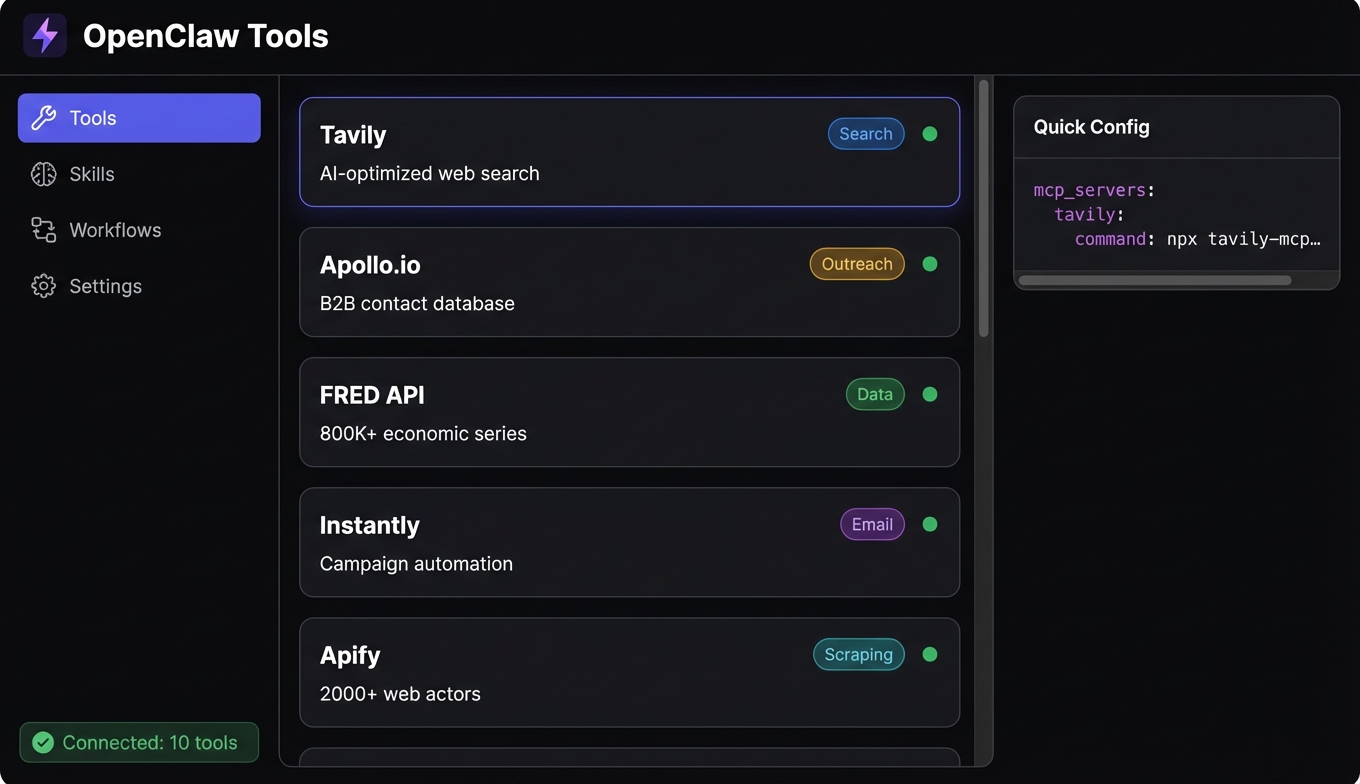
OpenClaw's power isn't in the framework — it's in what you plug into it. With 10,000+ MCP servers available, there's no shortage of options. The problem is finding the ones that actually work well with OpenClaw and solve real problems.
Here are the ten tools that earned permanent spots in my configuration after months of production use.
What Are OpenClaw Tools and Why They Matter
OpenClaw tools come in two flavors: skills (native OpenClaw plugins that extend your agent's capabilities directly) and MCP servers (external tools that connect via the Model Context Protocol). Both show up as tools your agent can call, but they're architecturally different.
Skills run inside the OpenClaw process — fast, tightly integrated, and purpose-built for the framework. MCP servers run as separate processes that communicate over stdio or HTTP, which means any tool built for the broader MCP ecosystem works with OpenClaw out of the box.
This matters because the MCP ecosystem is massive. Smithery alone catalogues over 7,300 MCP servers. But not all of them are well-maintained, well-documented, or useful for the kinds of workflows OpenClaw agents typically run. The tools below are the ones I keep coming back to.
Best OpenClaw Tools for Search and Research
1. Tavily
Tavily is the search tool purpose-built for AI agents, and it shows. With 3 million monthly SDK downloads and a $25 million raise in August 2025, it's become the default search layer for agentic workflows — and for good reason.
Unlike wrapping Google results in an API, Tavily returns structured, LLM-ready content. Your agent gets clean text with source attribution, not HTML soup it has to parse. For research-heavy skills that need to gather information from the web, Tavily eliminates an entire class of extraction bugs. (For Claude Code users, our Tavily MCP setup guide covers the JSON config step by step.)
# openclaw config snippet
mcp_servers:
  tavily:
    command: npx
    args: ["-y", "@tavily/mcp-server"]
    env:
      TAVILY_API_KEY: "your-key"
2. Apify
When your agent needs to go beyond search results and actually interact with websites — scraping product data, monitoring competitor pricing, extracting structured information from pages without APIs — Apify is the tool. Their MCP server exposes the full actor ecosystem, which means your OpenClaw agent can run any of thousands of pre-built scrapers.
I use it most for workflows that need data from sites that don't offer APIs. Point it at a page, define what you want extracted, and let the agent handle the rest.
3. NewsAPI
For agents that need real-time awareness of current events, NewsAPI provides access to 150,000+ news sources. It's particularly useful in monitoring workflows — have your agent check for mentions of specific topics, companies, or keywords on a schedule, and surface anything relevant.
Pair it with Tavily for a research pipeline that handles both broad web search and news-specific queries without overlap.
Best OpenClaw Tools for Outreach and Email
4. Apollo.io
Apollo.io gives your agent access to one of the largest B2B contact databases available. For sales research workflows — finding decision-makers at target companies, enriching lead lists with verified contact data, building prospect profiles — it's the most comprehensive single source.
The MCP integration exposes search, enrichment, and list management. An OpenClaw agent can take a vague instruction like "find the VP of Engineering at Series B fintech companies in New York" and return a structured list with contact details.
5. Instantly.ai
Once you have contacts from Apollo, Instantly handles the outreach side. It's an email automation platform with built-in warm-up, deliverability optimization, and campaign management. The MCP server lets your agent create campaigns, manage sending schedules, and monitor results.
The combination of Apollo for prospecting and Instantly for outreach is one of the most common OpenClaw tool workflows I've seen in production. Our sales prospecting pipeline guide walks through the complete Apollo → Reoon → Instantly chain.
6. Reoon
Email verification sounds boring until you send a campaign to 500 addresses and 15% bounce, tanking your sender reputation. Reoon sits between your contact data and your outreach tool, validating email addresses before they hit a campaign. Your agent can verify in bulk as part of the pipeline — no manual step required.
7. AgentMail
AgentMail takes a different approach from Instantly. Rather than campaign-style outreach, it's built for agents that need to send and receive individual emails as part of a conversational workflow. Think: an agent that handles customer inquiries, sends follow-ups, and manages threads — not batch sends, but genuine email interaction.
Best OpenClaw Tools for Data and Analytics
8. FRED API
The FRED API gives your agent access to the Federal Reserve's economic database — over 800,000 data series covering everything from GDP and unemployment to interest rates and housing starts. For any workflow that involves economic analysis, market research, or financial context, it's indispensable.
I use it in research agents that need to ground their analysis in real data rather than relying on the LLM's training data (which is always somewhat stale for economic figures).
9. Census Bureau API
Demographic and economic data from the U.S. Census Bureau. Population statistics, income distributions, business patterns, housing data — the kind of foundational data that makes market analysis workflows credible. Pair it with FRED for a data stack that covers both macroeconomic trends and demographic detail.
10. Google Trends
Google Trends gives your agent access to search interest data over time. It's useful for content strategy agents (what topics are gaining traction), market research workflows (is interest in a product category growing or declining), and competitive analysis (how does brand awareness compare across competitors).
The data is relative rather than absolute, which means it's best used for trend direction and comparison rather than exact volume estimates.
How to Install and Configure OpenClaw Tools
Adding MCP servers to OpenClaw is straightforward. Each tool gets an entry in your OpenClaw configuration:
mcp_servers:
  tavily:
    command: npx
    args: ["-y", "@tavily/mcp-server"]
    env:
      TAVILY_API_KEY: "tvly-xxxxx"

  apollo:
    command: npx
    args: ["-y", "@apollo/mcp-server"]
    env:
      APOLLO_API_KEY: "your-key"

  fred:
    command: npx
    args: ["-y", "@fred/mcp-server"]
    env:
      FRED_API_KEY: "your-key"
A few tips from running these in production:
- Start with two or three tools. Adding all ten at once floods your agent's context with tool descriptions, making it harder to pick the right one. Add tools as your workflows need them.
- Use stdio transport for local tools. It's faster and simpler than HTTP. Only use Streamable HTTP when the server needs to run remotely.
- Set up API keys before connecting. Most of these tools have free tiers — Tavily, FRED, Census Bureau, and Google Trends all offer free access that's sufficient for development and light production use.
Building Workflows by Combining OpenClaw Tools
Individual tools are useful. Combined workflows are where the real leverage is. Here are three patterns that work well:
Research pipeline
Tavily (broad search) → NewsAPI (current events) → FRED + Census (data grounding) → agent synthesizes a research brief. Total time: 30-60 seconds for a topic that would take a human analyst hours.
Sales prospecting pipeline
Apollo (find contacts) → Reoon (verify emails) → Instantly (launch campaign) → AgentMail (handle replies). This chain turns "find me leads in the healthcare SaaS space" into a running outreach campaign with verified contacts.
Market analysis pipeline
Google Trends (interest signals) → Tavily (competitive research) → FRED (economic context) → Census (demographic data) → agent produces a market report with real data backing every claim.
The key to making these work: let the agent orchestrate. Define the tools, describe the goal, and let OpenClaw figure out the execution order. The framework's agent loop handles tool selection and chaining naturally — you don't need to hard-code the pipeline unless you want deterministic ordering.
For more on choosing between MCP servers across different frameworks (not just OpenClaw), see our best MCP tools guide. And if you're comparing where to discover these tools, our AI agent marketplace comparison covers the main directories.
Frequently Asked Questions
What are OpenClaw tools?
OpenClaw tools are extensions that give your AI agent new capabilities. They come in two forms: native OpenClaw skills (plugins that run inside the framework) and MCP servers (external tools that connect via the Model Context Protocol). Both appear as callable tools to your agent. The MCP ecosystem has over 10,000 published servers as of early 2026, and any MCP-compatible tool works with OpenClaw without custom integration.
How do I install OpenClaw MCP servers?
Add the server configuration to your OpenClaw config file with the command, arguments, and any required environment variables (like API keys). Most servers install via npx and require no manual dependency management. After adding the configuration and restarting OpenClaw, your agent automatically discovers the new tools at runtime through MCP's dynamic discovery protocol.
Are OpenClaw tools free?
Many OpenClaw tools have generous free tiers. Tavily, FRED API, Census Bureau API, and Google Trends all offer free access suitable for development and moderate production use. Tools like Apollo.io, Instantly, and Apify have free tiers with usage limits and paid plans for higher volume. The MCP servers themselves (the connectors) are typically open-source — you pay for the underlying service API, not the integration layer.
Can I use OpenClaw tools with other AI agent frameworks?
Yes. Because most OpenClaw tools are standard MCP servers, they work with any MCP-compatible client — Claude Code, Cursor, Windsurf, LangChain, CrewAI, and others. The tool itself doesn't care which framework is calling it. This portability is one of MCP's core design goals and means your investment in configuring and learning these tools transfers across frameworks.
How many OpenClaw tools should I use at once?
Start with two or three that directly support your primary workflow. Each tool adds descriptions and schemas to your agent's context, and too many tools can cause selection confusion — the agent picks a similar-but-wrong tool or wastes tokens evaluating irrelevant options. Scale up as your workflows demand it. Production agents typically use five to eight tools across a mix of search, data, and action categories.