OpenClaw Marketplace: Where to Find the Best Tools
OpenClaw's skill system makes it one of the most extensible agent frameworks available — but extensibility is only as good as the ecosystem around it. If you can't find quality tools, the ability to install them doesn't matter.
The challenge isn't whether tools exist. It's that they're scattered across GitHub repos, npm packages, community forums, and directories with different curation standards.
This guide compares the current options for finding OpenClaw tools and helps you pick the right source for your workflow.
What Is the OpenClaw Marketplace
An OpenClaw marketplace is any platform where you can discover, evaluate, and install tools specifically for OpenClaw agents. These tools include:
- Skills — Packaged bundles with instructions, configuration, and sometimes scripts that teach your agent how to handle specific workflows. Skills include a
SKILL.mdthat the agent reads to understand when and how to use associated tools. - MCP servers — External capabilities that connect via the Model Context Protocol. Search, email, databases, scraping — each runs as a separate process your agent can call.
- Workflows — Pre-built multi-tool pipelines that chain skills and MCP servers for specific outcomes like research, outreach, or data analysis.
The key word is specifically. Generic MCP directories list everything for every client. An OpenClaw skills marketplace filters for compatibility, tests against OpenClaw's skill architecture, and provides installation paths that work with OpenClaw's config format.
For a deeper look at how skills work under the hood, see our guide on OpenClaw skills.
Why OpenClaw Needs a Dedicated Tool Marketplace
OpenClaw's skill architecture is different from how Claude Code or Cursor handle tools. While those tools connect to raw MCP servers and present them as function calls, OpenClaw's skill system adds an instruction layer — the SKILL.md that guides agent behavior.
This means generic MCP server directories aren't enough. An MCP server that works fine with Claude Code might technically connect to OpenClaw, but without a proper skill wrapper, the agent won't know when to use it, how to chain it with other tools, or what pitfalls to avoid.
A dedicated OpenClaw tool store addresses three specific gaps:
Compatibility verification. Not every MCP server works cleanly with OpenClaw's transport and session management. A marketplace that tests tools against current OpenClaw versions saves you from discovering incompatibilities mid-workflow.
Skill-level packaging. Raw MCP servers need skill wrappers to work well in OpenClaw. A marketplace that provides skills — not just server connections — delivers significantly better agent behavior.
Configuration guidance. OpenClaw uses YAML config with specific conventions for environment variables, skill ordering, and transport settings. Marketplace tools that ship with tested config snippets eliminate the setup guesswork.
Comparing OpenClaw Tool Sources: ClawsMarket vs Alternatives
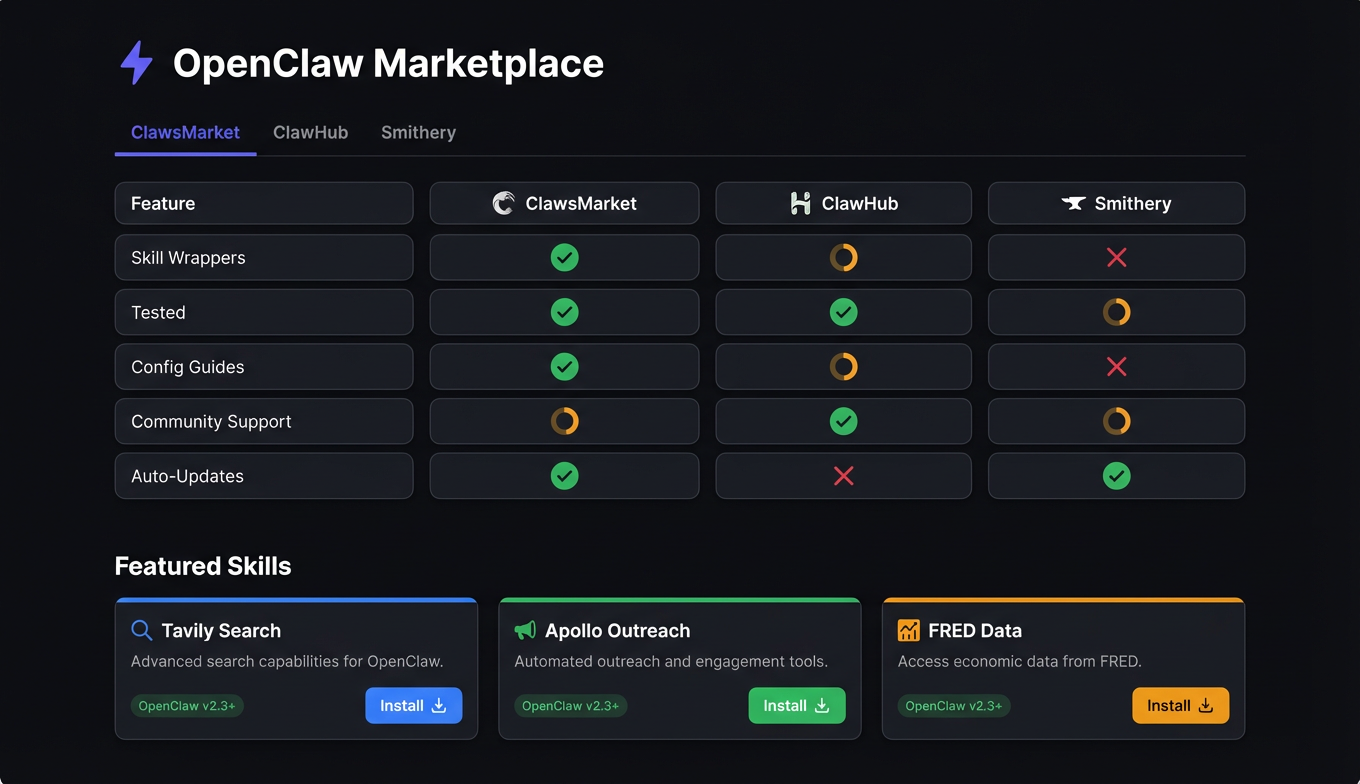
Here's how the current options for finding OpenClaw tools compare:
| Feature | ClawsMarket | ClawHub | Smithery | GitHub Search |
|---|---|---|---|---|
| Focus | OpenClaw + Claude Code tools | OpenClaw-native skills | General MCP directory | Everything |
| Total listings | Curated catalog | Community-contributed | 7,300+ MCP servers | Unlimited |
| OpenClaw skill wrappers | Yes, included | Yes, native format | No (raw MCP only) | Varies |
| Compatibility testing | Per OpenClaw version | Community-tested | Not OpenClaw-specific | None |
| Quality scoring | Multi-factor | Community ratings | Basic metadata | Stars only |
| Install method | Config snippets + CLI | openclaw skill install | Manual config | Manual |
| Config guidance | Full YAML examples | Included in skill | Minimal | Per-repo README |
| Security review | Reviewed before listing | Community flagging | No | None |
| Cost | Free to browse | Free | Free | Free |
ClawsMarket
Full disclosure: this is us. ClawsMarket focuses on curated, tested tools for OpenClaw and Claude Code. Every listing includes an OpenClaw skill wrapper (not just a raw MCP server), compatibility verification against current framework versions, and ready-to-paste YAML config. The catalog is intentionally smaller — we list tools we've verified rather than indexing everything.
Best for: developers who want tools that work out of the box with minimal setup.
ClawHub
ClawHub is OpenClaw's community-driven skill directory. Skills are contributed by the community in native OpenClaw format, which means they include SKILL.md files and proper configuration. Quality varies — popular skills get plenty of testing, niche ones might have rough edges. The direct openclaw skill install command makes installation frictionless.
Best for: developers who want the widest selection of OpenClaw-native skills and are comfortable evaluating quality themselves.
Smithery
Smithery is the largest general MCP directory, cataloguing thousands of servers across all MCP-compatible clients. The breadth is unmatched, but the listings aren't OpenClaw-specific. You'll find the MCP server you need, but you'll need to write your own skill wrapper and test compatibility yourself.
Best for: finding MCP servers for niche use cases that aren't covered by OpenClaw-specific marketplaces.
GitHub search
The catch-all. Any open-source MCP server or OpenClaw skill lives on GitHub somewhere. The problem is discovery — no quality signals beyond stars, no compatibility information, no installation guidance. You find raw potential and do all the integration work yourself.
Best for: advanced users looking for cutting-edge tools before they appear in any marketplace.
Top OpenClaw Tools Available Right Now
Across all sources, these tools consistently rank as the most installed and highest-rated for OpenClaw workflows:
Research and data
- Tavily — AI-optimized web search. The most installed search skill across all OpenClaw marketplaces. Returns structured, LLM-ready results.
- FRED API — 800,000+ economic data series from the Federal Reserve. Essential for any analysis workflow that needs real economic data.
- Apify — Web scraping via 2,000+ pre-built actors. Covers the gap when APIs don't exist — competitor pricing, product data, job listings.
- NewsAPI — Real-time access to 150,000+ news sources for monitoring and current events workflows.
Sales and outreach
- Apollo.io — B2B contact database for prospecting. Search by role, company, industry, and location.
- Reoon — Email verification. Validates addresses before they hit outreach campaigns. Prevents bounce-rate damage to sender reputation.
- Instantly.ai — Email campaign management with built-in warm-up and deliverability optimization.
- AgentMail — Conversational email for agents that need to handle ongoing threads, not just send campaigns.
Utility
- OpenRouter — Multi-model access through a single connection. Route different tasks to different models for cost optimization.
- Google Trends — Search interest data over time. Useful for content strategy, market validation, and trend detection.
How to Evaluate and Install Marketplace Tools
Evaluation checklist
Before installing any tool from any OpenClaw MCP marketplace:
-
Check OpenClaw compatibility. Does the listing specify which OpenClaw versions it's tested against? Untested tools may work, but you're accepting risk.
-
Read the SKILL.md. This file contains the instructions your agent will follow. Make sure they align with your expectations — a skill that tells the agent to always produce verbose output might conflict with your preference for concise responses.
-
Check the last update. Skills that haven't been updated in 90+ days with open issues may be abandoned. Active maintenance matters, especially as OpenClaw's skill API evolves.
-
Review API key requirements. Most skills connecting to external services need API keys. Verify that free tiers exist for testing before committing to paid services.
-
Test with a simple query. After installation, run a basic interaction that should trigger the skill. Confirm it connects, returns useful data, and doesn't error out.
Installation
From ClawsMarket, installation is a config entry:
# openclaw.yaml
skills:
  - name: tavily
    config:
      api_key: "${TAVILY_API_KEY}"
  - name: apollo
    config:
      api_key: "${APOLLO_API_KEY}"
From ClawHub, use the native CLI:
openclaw skill install tavily
openclaw skill install apollo
From Smithery or GitHub, you'll typically add a raw MCP server entry and optionally create your own skill wrapper:
mcp_servers:
  custom_tool:
    command: npx
    args: ["-y", "@package/mcp-server"]
    env:
      API_KEY: "${TOOL_API_KEY}"
For security considerations when installing third-party skills, see our guide on OpenClaw skill safety.
The Verdict
For most OpenClaw users: Start with ClawHub for community skills and ClawsMarket for curated, tested tools. Between the two, you'll cover the most common workflows with minimal setup friction.
For advanced users: Add Smithery as a discovery layer for niche MCP servers, then write skill wrappers to integrate them properly with OpenClaw.
For teams with security requirements: Prioritize marketplaces with review processes (ClawsMarket, ClawHub's flagging system) over raw GitHub installs. Review every SKILL.md before enabling it — these files directly control agent behavior.
The OpenClaw tool ecosystem is maturing fast. A year ago, finding compatible tools meant trawling GitHub. Today, dedicated marketplaces handle the compatibility testing, quality scoring, and installation packaging. Use them.
Frequently Asked Questions
What is the OpenClaw marketplace?
The OpenClaw marketplace refers to platforms where developers discover and install tools for OpenClaw agents — skills, MCP servers, and pre-built workflows. The main options are ClawsMarket (curated, tested tools with skill wrappers), ClawHub (community-contributed native skills), and Smithery (broad MCP directory not specific to OpenClaw). Each serves a different need: curation vs breadth vs OpenClaw-native format.
Where can I find OpenClaw skills?
The primary sources are ClawHub (OpenClaw's community skill directory with native openclaw skill install support), ClawsMarket (curated skills tested for compatibility), and GitHub (open-source skills and MCP servers you can adapt). For the best experience, start with ClawHub or ClawsMarket where skills come with proper SKILL.md files and tested configuration — raw MCP servers from general directories require additional skill wrapping to work optimally with OpenClaw.
Are OpenClaw marketplace tools free?
Browsing and installing from all major OpenClaw marketplaces is free. The tools themselves vary: many have free tiers (Tavily, FRED API, Census Bureau API, NewsAPI, Google Trends), while others like Apollo.io and Instantly.ai offer free tiers with usage limits and paid plans for higher volume. The skill packages and MCP server connectors are almost always open-source — you pay for the underlying API services, not the integration layer.
How do I know if a marketplace tool is safe?
Review the SKILL.md file before installing — it contains the exact instructions your agent will follow. Check the source repository for active maintenance, open security issues, and contributor history. Prefer tools from marketplaces with review processes (ClawsMarket reviews before listing; ClawHub has community flagging). Avoid skills that request overly broad permissions or unnecessary API access. For production deployments, pin skill versions and test updates in a staging environment before rolling them out.
What's the difference between ClawsMarket and ClawHub?
ClawsMarket is a curated marketplace that tests every tool for compatibility, provides quality scores, and includes OpenClaw skill wrappers with ready-to-use configuration. ClawHub is OpenClaw's community-driven directory where anyone can contribute skills in native format, with quality regulated by community ratings and usage data. ClawsMarket prioritizes reliability and ease of setup; ClawHub prioritizes breadth and community contribution. Many developers use both — ClawsMarket for core tools and ClawHub for specialized or niche skills.